Notes
A collection of tips I've learned about Claude Code. This will be updated over time.
Note
Some features are listed but unverified because I hit Claude Code rate limits. Unverified items are marked with Unverified.
Best practices
Documentation about Skills
| Document | Description |
|---|---|
| anthropics/skills: Public repository for Agent Skills | Official Skills |
| ComposioHQ/awesome-claude-skills: A curated list of awesome Claude Skills, resources, and tools for customizing Claude AI workflows | Awesome repository |
| VoltAgent/awesome-claude-skills: The awesome collection of Claude Skills and resources. | Awesome repository |
Language settings
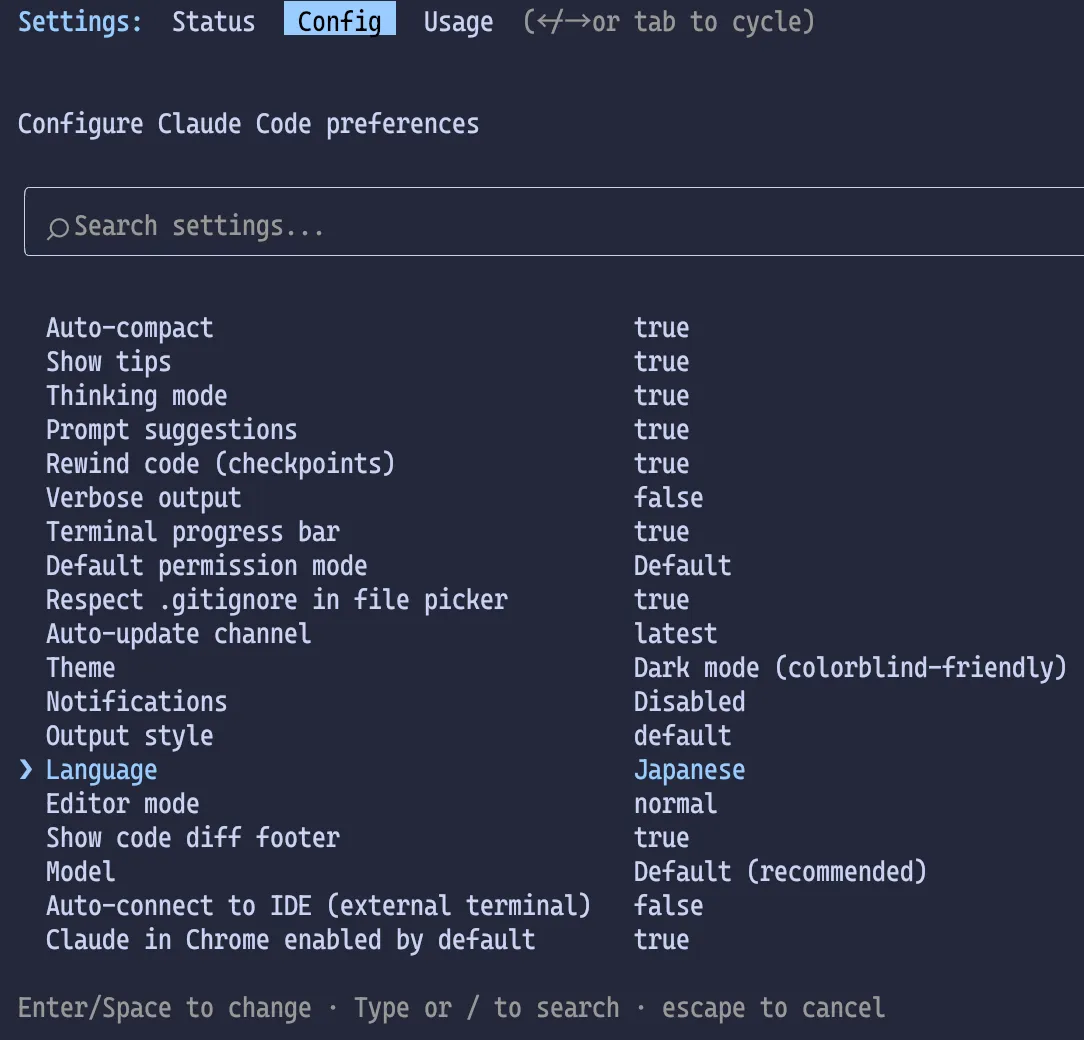
To set Claude Code to Japanese, run /config and set Language to Japanese or 日本語.
You can also use Language to set a tone in addition to the language.
This only changes the language Claude uses; the config UI itself stays in English.
Added
languagesetting to configure Claude's response language (e.g., language: "japanese")
This is supported since 2.1.0.
Setup steps
Configure inside Claude Code
Launch Claude Code, type /config, and press Enter.
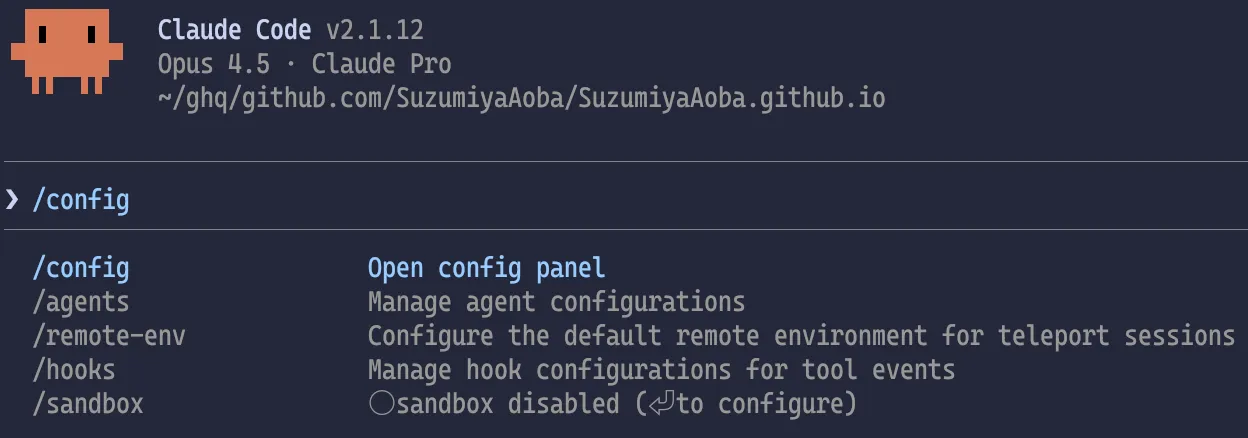
When the settings screen appears, move the cursor to Language with ↓ and press Enter.
An input field appears. Enter Japanese or 日本語 and press Enter.
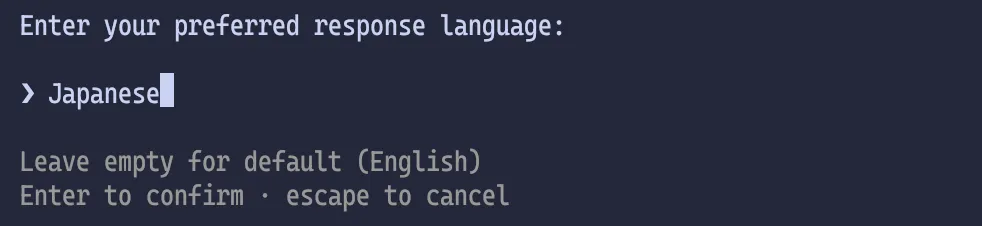
Now the default language for Claude Code is Japanese. Press Esc to exit the settings screen.
~/.claude/settings.json
Alternatively, add the following to ~/.claude/settings.json.
1{2"language": "日本語"3}
This has the same effect as setting it via /config.
Hide account info shown at startup
When Claude Code starts, it shows your email address and session history.
If you want to hide that, set the environment variable CLAUDE_CODE_HIDE_ACCOUNT_INFO to 1.
1{2"env": {3"CLAUDE_CODE_HIDE_ACCOUNT_INFO": "1"4}5}
If you only want to hide it for a specific repository, add the same setting to .claude/settings.json inside that repo.
Play a notification sound when tasks finish
To detect when a task finishes, add a hook to play a sound.
Add the following to ~/.claude/settings.json (macOS example).
1{2"hooks": {3"PermissionRequest": [4{5"matcher": "*",6"hooks": [7{8"type": "command",9"command": "afplay /System/Library/Sounds/Tink.aiff"10}11]12}13],14"Stop": [15{16"hooks": [17{18"type": "command",19"command": "afplay /System/Library/Sounds/Tink.aiff"20}21]22}23]24}25}
On macOS, pick any file from /System/Library/Sounds/ and update the path after afplay.
If you use both Codex and Claude Code, it might be nice to set different sounds for each.
1$ ls -la /System/Library/Sounds/2.rw-r--r--@ 221k root 22 11月 2025 ♫ Basso.aiff3.rw-r--r-- 404k root 22 11月 2025 ♫ Blow.aiff4.rw-r--r-- 223k root 22 11月 2025 ♫ Bottle.aiff5.rw-r--r--@ 207k root 22 11月 2025 ♫ Frog.aiff6.rw-r--r--@ 623k root 22 11月 2025 ♫ Funk.aiff7.rw-r--r--@ 475k root 22 11月 2025 ♫ Glass.aiff8.rw-r--r-- 304k root 22 11月 2025 ♫ Hero.aiff9.rw-r--r--@ 203k root 22 11月 2025 ♫ Morse.aiff10.rw-r--r--@ 432k root 22 11月 2025 ♫ Ping.aiff11.rw-r--r--@ 469k root 22 11月 2025 ♫ Pop.aiff12.rw-r--r--@ 218k root 22 11月 2025 ♫ Purr.aiff13.rw-r--r--@ 443k root 22 11月 2025 ♫ Sosumi.aiff14.rw-r--r--@ 430k root 22 11月 2025 ♫ Submarine.aiff15.rw-r--r--@ 163k root 22 11月 2025 ♫ Tink.aiff
Choose the directory for Plan mode output Unverified
In Plan mode, generated plans are saved under ~/.claude/plans/ by default.
1$ tree ~/.claude/plans/2~/.claude/plans/3├── elegant-questing-lamport.md4├── gleaming-drifting-anchor.md5├── misty-mixing-reddy.md6└── virtual-sprouting-moler.md781 directory, 4 files
You can change the destination via plansDirectory in settings.json.
Added
plansDirectorysetting to customize where plan files are stored
1{2"plansDirectory": "./plans"3}
If your team uses Claude Code and you want to review how others planned their implementation, you can set this per repo in .claude/settings.json and include the plans in PR reviews. That makes it easier to spot weak planning and also a good way to share knowledge.